Lesson 11: String Initialization Techniques

Lesson 61/93 | Study Time: 30 Min
Lesson 11: String Initialization Techniques

Learning Outcomes:


i. Discover different ways to bring your textual treasures to life by initializing strings in your programs.


ii. Master the art of directly assigning your desired words to string variables.


iii. Learn how to let users fill your treasure chest with their own text, adding dynamism to your programs.


iv. Feel equipped to initialize strings in diverse scenarios, building expressive and interactive software.


Introduction:


Remember the world of words you unlocked in the previous lesson? Now, it's time to fill your magical treasure chest – the string variable! This lesson explores various techniques for initializing strings, giving you the power to breathe life into your textual data and bring interactivity to your programs.


i. Direct Declarations:


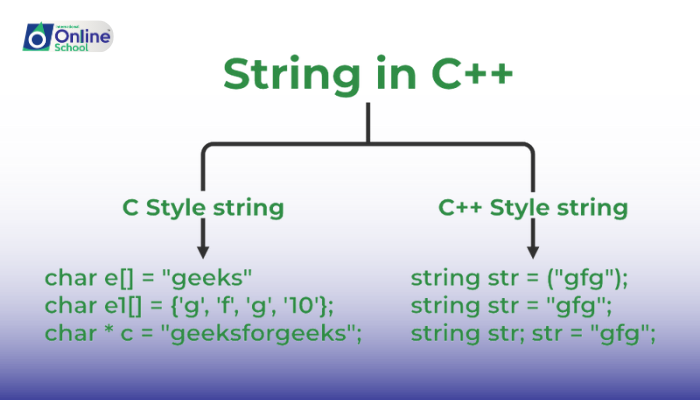
The simplest way to fill your chest is by directly declaring the words you want. Imagine placing a beautiful sign saying "Welcome!" inside. You simply assign the text within quotes to a string variable, like greeting = "Welcome!". This tells the computer to create a special storage space filled with those specific words.


ii. Concatenation Magic:


Sometimes, your treasure chest needs two signs instead of one! Think about combining two smaller chests to make a bigger one. String concatenation allows you to join parts of text together. Imagine merging "Hello" and ", my friend!" to create a warm "Hello, my friend!" This lets you build longer messages and sentences by piecing together smaller texts.


iii. User Input Treasures:


Want to make your program truly interactive? You can let users fill your chest themselves! Imagine placing a blank book inside and inviting users to write their own messages. By using functions like input(), you can store whatever users type directly into your string variable. This opens up a world of possibilities for personalized experiences and user-driven programs.


iv. Beyond Literal Words:


Remember, your treasure chest isn't limited to just plain text! You can store other symbols too, like numbers, emojis, and even special characters. Imagine placing a smiley face emoji "" or a musical note "" inside your string. This allows you to add expressiveness, fun, and even multimedia elements to your programs.


Mastering string initialization techniques gives you the building blocks for creating diverse and interactive programs. By understanding direct declarations, concatenation, user input, and symbol inclusion, you can shape your textual treasures to bring life to your software creations. Remember, practice makes perfect, so keep exploring different initialization methods and experiment with unique textual data to become a confident string artist in your programming journey!


Saboor Ali

Saboor Ali

Product Designer

Class Sessions

1- Lesson 01: Introduction to Operating Systems 2- Lesson 02: Commonly-Used Operating Systems 3- Lesson 03: Types of Operating Systems (1-4) 4- Lesson 04: Types of Operating Systems (5-8) 5- Lesson 05: Embedded Operating Systems 6- Lesson 06: Single-User and Multi-User Operating Systems 7- Lesson 07: Main Functions of Operating System (1-4) 8- Lesson 08: Main Functions of Operating System (5-8) 9- Lesson 09: Understanding Processes 10- Lesson 10: Thread vs. Process 11- Lesson 11: Multi-Threading, Multi-Tasking, and Multi-Programming 12- Lesson 01: Introduction to Systems 13- Lesson 02: Overview of System Development Life Cycle (SDLC) 14- Lesson 03: Objectives of SDLC 15- Lesson 04: Stakeholders and Their Role in SDLC 16- Lesson 05: Planning in SDLC 17- Lesson 06: Feasibility Study 18- Lesson 07: Analysis and Requirement Engineering 19- Lesson 08: Design Phase 20- Lesson 09: Coding and Implementation 21- Lesson 10: Testing, Deployment, and Maintenance 22- Lesson 11: Management in SDLC 23- Lesson 12: Project Manager's Role 24- Lesson 13: System Analyst's Role 25- Lesson 14: Programmer's Contribution 26- Lesson 15: Software Tester's Role 27- Lesson 16: Customer Engagement 28- Lesson 01: Introduction to Programming 29- Lesson 02: C++ Program Structure 30- Lesson 03: Statement Terminator and Comments 31- Lesson 04: Constants and Variables 32- Lesson 05: Variable Naming Rules 33- Lesson 06: C++ Data Types 34- Lesson 07: Constant Qualifier - const 35- Lesson 08: Declaring and Initializing Variables 36- Lesson 09: Type Casting in C++ 37- Lesson 10: Displaying Output with cout Statement 38- Lesson 11: Input with cin Statement 39- Lesson 12: Functions getch( ), gets( ), and puts( ) 40- Lesson 13: Escape Sequences in C++ 41- Lesson 14: Input/Output Handling Functions 42- Lesson 15: Using Manipulators endl and setw 43- Lesson 16: Operators in C++ 44- Lesson 17: Identifying Unary, Binary, and Ternary Operators 45- Lesson 18: Defining an Expression 46- Lesson 19: Order of Precedence of Operators 47- Lesson 20: Compound Expressions 48- Lesson 21: Defining Compound Statements 49- Lesson 01: Decision Statements 50- Lesson 02: Looping Structures 51- Lesson 01: Introduction to Arrays 52- Lesson 02: Array Terminology 53- Lesson 03: Defining and Initializing Arrays 54- Lesson 04: Accessing and Writing in Arrays 55- Lesson 05: Array Traversal with Loops 56- Lesson 06: Using the size of() Function 57- Lesson 07: Introduction to Two-Dimensional Arrays 58- Lesson 08: Working with Two-Dimensional Arrays 59- Lesson 09: Accessing and Writing in Two-Dimensional Arrays 60- Lesson 10: Understanding Strings 61- Lesson 11: String Initialization Techniques 62- Lesson 12: Commonly Used String Functions 63- Lesson 01: Introduction to Functions 64- Lesson 02: Advantages of Using Functions 65- Lesson 03: Function Signature and Terminology 66- Lesson 04: Variables in Functions 67- Lesson 05: Parameters in Functions 68- Lesson 06: Local and Global Functions 69- Lesson 07: Inline Functions 70- Lesson 08: Passing Arguments 71- Lesson 09: Default Arguments and Return Statements 72- Lesson 10: Function Overloading Basics 73- Lesson 11: Advantages of Function Overloading 74- Lesson 12: Function Overloading with Different Arguments 75- Lesson 01: Introduction to Pointers 76- Lesson 02: Memory Addresses and Pointers 77- Lesson 03: Reference Operator (&) 78- Lesson 04: Dereference Operator (*) 79- Lesson 05: Declaration of Pointer Variables 80- Lesson 06: Initializing Pointers 81- Lesson 01: Introduction to Classes and Objects 82- Lesson 02: Members of a Class 83- Lesson 03: Access Specifiers and Data Hiding 84- Lesson 04: Constructors and Destructors 85- Lesson 05: Declaring Objects and Accessing Members 86- Lesson 06: Understanding Inheritance with Examples 87- Lesson 07: Exploring Polymorphism with Examples 88- Lesson 01: Introduction to File Handling 89- Lesson 02: Opening Files with Different Modes 90- Lesson 03: Understanding BOF and EOF 91- Lesson 04: Defining Streams 92- Lesson 05: Using Single Character Streams 93- Lesson 06: Using String Streams